- Noise For Fun - This site has a blend of high quality, unique sound effects, which have been "exclusively produced". Although many of the sound effects have a distinct sci-fi feel to them, under the "Fantasy and Magic" section you might find some sound effects you can use for skills.
- Free SFX - This site has quite an impressive collection of sound effects. It also has some amazing music tracks. You'll need to register first before you can download anything, but it's worth it.
- Soundcli.ps - This site boasts 10,000+ sounds! All sounds a free to download in MP3 format. What I like most about this site is that you can preview and download the sound effects without leaving the page too often.
02 September 2012
01 September 2012
29 August 2012
28 August 2012
18 August 2012
15 August 2012
12 August 2012
11 August 2012
29 July 2012
21 July 2012
 Now, instead of creating each door individually, using the same events commands with each one. The only thing you need to do is name the door event "Door". The animation will then be displayed.
View the script details here.
More Sound Effects for RPG Maker
Following on from this post, here are some more websites for sound effects.

Melodia (Rpg Maker VX ACE)
Here's another awesome script from Moghunter. The Melodia script for RMVXA is a "rhythm game" in a similar vein to Guitar Heroes, where you press keys with the notes as they travel down the "note highway".
I've played Guitar Hero and many of its clones, and thoroughly enjoy it, but that's not to say I'm any good. My hand-to-eye coordination is rubbish! That said this is an excellent addition to your RMVXA script collection and will give your game an extra dimension.
 Mog's YouTube
 Download Script
I've played Guitar Hero and many of its clones, and thoroughly enjoy it, but that's not to say I'm any good. My hand-to-eye coordination is rubbish! That said this is an excellent addition to your RMVXA script collection and will give your game an extra dimension.
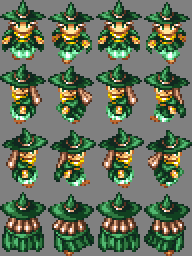
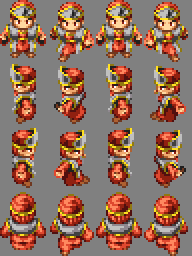
Charsets for RMXP
Here are a few decent character sets for RMXP I found. The website doesn't have that much content, but I rather like the charsets.
How To Convert an RMVX Game To RMVXA
Here's another essential utility for all RMVX/RMVXA users. I've not had an opportunity to try it out, but judging from the video it is very useful for those who have made the transition from RMVX to RMVXA.
You can download the utility directly here.
Caveat: It's important to note (as mentioned in the video) that it's highly unlikely that this utility will convert scripts, since RGSS2 and RGSS3 are vastly different. You'll have to convert the scripts on your own or find alternative scripts.
You can download the utility directly here.
Caveat: It's important to note (as mentioned in the video) that it's highly unlikely that this utility will convert scripts, since RGSS2 and RGSS3 are vastly different. You'll have to convert the scripts on your own or find alternative scripts.
RMXP to RMVX Ace Windowskin Converter
It's easy to convert windowskins from RMXP to RMVX and RMVX to RMVXA, but not really from RMXP to RMVXA. This utility (in the form of a script) lets you convert RMXP windowskins to RMVXA format. And while I can't test this out yet, it has some positive reviews so is definitely worth sharing.
So, here is the link to the RGSS3 utility. Install it as you would any other script. Get the RMXP to RMVXA Windowskin Converter.
So, here is the link to the RGSS3 utility. Install it as you would any other script. Get the RMXP to RMVXA Windowskin Converter.
Custom Menu System [Radial] for RM2K3
This tutorial demonstrates how to create your own Custom Menu System (CMS) and "radial" menu for RM2K3. This is the first RM2K3 entry I've done in quite some time, but someone I know requested it so this is for you, my friend.
This is the Part 1. The second part can be found here.
Note: This should also work with RM2K with some tweaking.
This is the Part 1. The second part can be found here.
Note: This should also work with RM2K with some tweaking.
Simple Animated Title (RMVXA)
This simple script manipulates the title (defined in the Database) and animates it, from the top of the screen to the centre of the screen above the menu. It was written specifically for the Paranormality 1: Darkling before the Trial ran out.
Note: This version does not have the mouse system or the "Continue" feature implemented.
Note: This version does not have the mouse system or the "Continue" feature implemented.
Cutscene Tutorial - RMVX
This is a very commonly asked question, so here is a good tutorial from GeniusInMotion. It's around 30-minutes long, but it's worth watching to give an idea of how to create a cutscene.
The same principles also apply to RMXP and RMVXA, although if you're competent at making movies from scratch RMVXA will allow you to call the movie instead.
The same principles also apply to RMXP and RMVXA, although if you're competent at making movies from scratch RMVXA will allow you to call the movie instead.
RMVXA Windowskins
In RMVXA, windowskins aren't really necessary since you can change the windowskin colours in the Database. However, this is the same as the standard default window prevalent in RMVX.
All RMVX windowskins will work in RMVXA. Caveat: The "Window Color" will override the windowskin background colour unless you change it manually.
All RMVX windowskins will work in RMVXA. Caveat: The "Window Color" will override the windowskin background colour unless you change it manually.
How To Import A Windowskin Into RMVXA
- Open the Resource Manager (F10).
- Import the RMVX Windowskin into the Graphics/Systemand set the transparencies (the same way you would in RMVX).
- Open the Database (F9) and in the System tab, double-click on Window Color to change the RGB accordingly via the sliders.
- In the same way as RMVX, the the Window_Base script needs to be modified to update to the new windowskin.
class Window_Base < Window
  alias cwvxws_initialize initialize
  def initialize(x, y, width, height)
    cwvxws_initialize(x, y, width, height)
    self.windowskin = Cache.system("Roma")
  end
end
Automatic Door Script (RMXP/VX/VXA)
Visit the site
here
Setting up animated doors manually through eventing are now passé thanks to this script. It's compatible with RMXP, RMVX and RMVXA and it definitely makes life easier!
here

View the script details here.
Subscribe to:
Posts (Atom)


Total Pageviews

|
Popular Posts
-
 There are quite a few Online Creators for RMXP/RMVX already, mostly Japanese sites. I recently discovered - quite by accident - a French si...
 -
While going through my bookmarks, I came across a few Faceset Generators, which I thought I'd share. RMVX/RMXP Faceset Generator - I ...
-
If you're not a great graphic artist, like me, there are several websites that allow you to create your own, thus: Character Sprite Gene...
-
 View More Windowskins While playing around with the Windowskin Generator I mentioned in a previous entry, I've created some cool Window...
 -
If you're looking for some quality sprites, then look no further than Magnus Noctem . Unless otherwise specified, these are RMVX sprites...
Featured Post
New Resources for RMMV
A few RMMV resources have been added today. Game Over Graphics - These have been created with Daz 3D Studio and GIMP , with titles from...

Like This Blog?
Share It

Donate A "Gesture of Appreciation"
Do you like this blog? Then why not consider a donation, however small? It'd be a "Gesture of Appreciation" and some of the money may go towards prizes for future competitions too!Thank you for visiting RPG Maker Times.
Blog Net


Copyright Information
 Contact Us | Terms & Conditions | Privacy Statement
Copyright: © 2008-2017, Companion Wulf - RPG Maker Times. All Rights Reserved.