In Part 1, we dealt with the basic menu structure and how the the commands are displayed and called. Part 2 expands on that and details how to execute the routines when the menu item is selected.
Scroll down to case @command_window.index (line 123 in RMXP and line 88 in RMVX). This is where the execution methods are defined, telling RPG Maker that when a menu item (the menu index if you recall) is selected, call the appropriate command.
This is processed in the definition update_command in RMXP and update_command_selection in RMVX. And this is where we need to change the code so that it does what it's supposed to do when the menu item is selected. The default structure is as follows:
15 October 2010
12 October 2010
30 September 2010
28 September 2010
26 September 2010
24 September 2010
23 September 2010
14 September 2010
29 August 2010

Customizing Menus: Part 1 - Menu Structure
In this multi-part tutorial, I'll demonstrate how to customize the default menu (Scene_Menu) in both RMXP and RMVX. Scripting the menu is more frustrating than difficult because it doesn’t allow you to simply append new commands to the existing menu and only the menu items manually added into the menu script will appear. So we have to manually add them to form our basic menu. (That said, for the non-scripters, SojaBird's excellent New Menu Items script makes it easier to collate existing menu items and add new ones.)
For the purpose of this tutorial, however, we'll be modifying the existing Scene_Menu to add an Extra Stats window. First thing's first, let's explore how the menu structure is set up.
The basic structure for the menu in each RPG Maker is the same, but RMVX also has the additional option of multi-columns in the menu, which we'll cover later.
By default, it's set to 0, the first item on the menu list. The number increases by one for every menu item below the first command, which means that every time the cursor is moved down to the next command it increases by one. Conversely, if the cursor is moved up one command the index decreases by one. So, if you were to set the menu_index to 4, when you open the status menu the cursor would default to "Save" every time you open it.
For the purpose of this tutorial, however, we'll be modifying the existing Scene_Menu to add an Extra Stats window. First thing's first, let's explore how the menu structure is set up.
The basic structure for the menu in each RPG Maker is the same, but RMVX also has the additional option of multi-columns in the menu, which we'll cover later.
Initialize The Menu Index
The first section sets the command cursor's initial position.
def initialize(menu_index = 0)
@menu_index = menu_index
end
@menu_index = menu_index
end
By default, it's set to 0, the first item on the menu list. The number increases by one for every menu item below the first command, which means that every time the cursor is moved down to the next command it increases by one. Conversely, if the cursor is moved up one command the index decreases by one. So, if you were to set the menu_index to 4, when you open the status menu the cursor would default to "Save" every time you open it.
The Mysterious Disappearing Images
Bear with me, folks! Image Shack has a nasty habit of "losing" images, sometimes they will disappear, and sometimes they will reappear. So I'm in the process of transferring them elsewhere. I started this hideous process before, but there were way too many and I was overwhelmed at how time-consuming it was. I'm not going to put up with it any longer. It's time it was done properly and once and for all.
Also, I'm in the process of transferring everything on the RPG Maker 2K3 Master blog here, since I'll be officially closing it at the end of the month. The reason for this is that, having everything RPG Maker combined, will make things much easier. My initial consideration for having a separate blog for RM2K3 and another for RMXP/RMVX was to house the various RM2K3 tutorials I’d written, and besides, RPG Maker 2K3 Master was the "original" blog, the first I’d created. There comes a time, however, when change is necessary. There are some big changes coming to RPG Maker Times - nothing scary, just more content.
Eventually my focus on RM2K3 will fizzle out in favour of RMXP and RMVX, although probably not altogether. What I’m hoping for is more content, scripts, resources, resource templates and tutorials, and games/project reviews.
Also, I'm in the process of transferring everything on the RPG Maker 2K3 Master blog here, since I'll be officially closing it at the end of the month. The reason for this is that, having everything RPG Maker combined, will make things much easier. My initial consideration for having a separate blog for RM2K3 and another for RMXP/RMVX was to house the various RM2K3 tutorials I’d written, and besides, RPG Maker 2K3 Master was the "original" blog, the first I’d created. There comes a time, however, when change is necessary. There are some big changes coming to RPG Maker Times - nothing scary, just more content.
Eventually my focus on RM2K3 will fizzle out in favour of RMXP and RMVX, although probably not altogether. What I’m hoping for is more content, scripts, resources, resource templates and tutorials, and games/project reviews.
Ars Magia 1: Genesis - Character Classes
The Ars Magia Character Classes are now 80% complete.
There are five main playable character classes and two non-playable ones. They are:
The fifth playable character is pending, as I'm not sure what it should be. I had considered Blue Mage or Black Mage. Suggestions are welcome, use the comments box for any suggestions or recommendations on what this fifth character should be.
There are five main playable character classes and two non-playable ones. They are:
- Alchemist (Non-Playable) - Adept at potion making, including explosives and incendiaries.
- Archaeomage (Non-Playable) - Expert in ancient technologies and automatons.
- Cleric (Playable) - Expert in healing and blessing spells.
- Druid (Playable) - Caster of elemental spells and can also summon animals.
- Hunter (Playable) - Expert archer, keen-sighted and fleet-footed. Note: Content is pending.
- Warrior (Playable) - Combat veteran, capable of delivering powerful blows.
The fifth playable character is pending, as I'm not sure what it should be. I had considered Blue Mage or Black Mage. Suggestions are welcome, use the comments box for any suggestions or recommendations on what this fifth character should be.
RPG Maker VX Windowskins #8
Here are some more RMVX windowskins. As always, they were created with the Windowskin Generator. Also as usual, these are also placed on the sister blog, RPG Maker Times Companion, where you can collectively view the other RMVX and RMXP windowskins. Right-click and save the image to your hard drive.
Note: Woodsy 1 and 2 are currently MIA! I'll upload them when (if?) I find them.
Charred Parchment |
Fiery #1 |
Fiery #2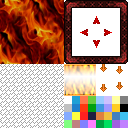 |
|---|---|---|
Parchment #5 |
Woodsy #3 |
Note: Woodsy 1 and 2 are currently MIA! I'll upload them when (if?) I find them.
Status Window Help Menu Script
What this script does is simply to add a help window displaying descriptions of each item in the status menu. This was requested by someone who was having difficulty implementing something similar, so it's really a tutorial than a full script. I've posted it regardless in case others can use it.
 Copy and paste it anywhere in Materials (or above Main) and it should work, as it's Plug 'n' Play. Additional instructions of use are in the script.
It's easy to modify, as there are only two sections where additional descriptions can be appended. Again, these are clearly definite in the script itself.
Copy and paste it anywhere in Materials (or above Main) and it should work, as it's Plug 'n' Play. Additional instructions of use are in the script.
It's easy to modify, as there are only two sections where additional descriptions can be appended. Again, these are clearly definite in the script itself.
Critical Hit Flash Screen Scriptlet
It's funny how, when you're poking around in the RGSS scripts, a small portion of the script jumps out at you. You then feel inspired to "tweak" it and an enhancement or scriptlet is born. That's what happened with this one.
It's a very simple battle add-on that flashes the screen red and plays a sound whenever a critical hit has been delivered. The colour and sound can be modified in the script to something more suitable for a game's needs.
Copy and paste it anywhere in Materials (or above Main) and it's ready to go.
It was created using RMVX, but looks as though it would be compatible with RMXP as well (I can't test it in RMXP). And it's compatible with Modern Algebra's Damage Popup script also.
It's a very simple battle add-on that flashes the screen red and plays a sound whenever a critical hit has been delivered. The colour and sound can be modified in the script to something more suitable for a game's needs.
Copy and paste it anywhere in Materials (or above Main) and it's ready to go.
It was created using RMVX, but looks as though it would be compatible with RMXP as well (I can't test it in RMXP). And it's compatible with Modern Algebra's Damage Popup script also.
Ars Magia -- Upcoming Novella Tie-In
I’m in the process of writing a novella, also entitled Ars Magia: Genesis. It is a tie-in with the RPG Maker VX game, also currently under development.
Below is an interactive live demo, where you can read the complete Prologue. The full screen (and easier to read) version is viewable here.
Free website - Powered By Wix.com
I’m not sure which came first, novella or game. Perhaps they developed together, as they do go hand in hand. The novella sets the scene for the game and the game continues where the novella ends. That said, I wrote the plot and basic outline for the novella a while ago, then translated it into game format and, as development began, the story – more a preface to the game – evolved.
The novella is far from complete yet, but scheduled release date is March 2011 – if everything goes according to plan. Major updates to the novella will appear here in addition to the game progress.
Below is an interactive live demo, where you can read the complete Prologue. The full screen (and easier to read) version is viewable here.
Free website - Powered By Wix.com
I’m not sure which came first, novella or game. Perhaps they developed together, as they do go hand in hand. The novella sets the scene for the game and the game continues where the novella ends. That said, I wrote the plot and basic outline for the novella a while ago, then translated it into game format and, as development began, the story – more a preface to the game – evolved.
The novella is far from complete yet, but scheduled release date is March 2011 – if everything goes according to plan. Major updates to the novella will appear here in addition to the game progress.
RPG Maker VX Windowskins #7
Here are some more RMVX windowskins. As always, they were created with the Windowskin Generator. Also as usual, these are also placed on the sister blog, RPG Maker Times Companion, where you can collectively view the other RMVX and RMXP windowskins. Right-click and save the image to your hard drive.
I'll be making more soon, as inspiration takes me, but I've been drawn more towards "woodsy" windowskins lately. Don't know why though!
Darkness #1 |
Darkness #2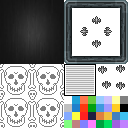 |
|---|---|
Darkness #3 |
Gold Wood |
Ars Magia 1: Genesis - New Project
It's funny - not funny as in haha!, but funny as in strangely sinister - how sometimes the things you plan meticulously for months in advance just simply fail! And you're back at the bottom of the ladder, having to crawl your way back up to where you were! Fate can be a cruel mistress!

Click on the image for the "official" update site.
Anyway, my new project! It's not really new, since I started it way before The Gladiator Project and lost interest in it, and thought I'd lost the project itself. I found it on a DVD gathering dust, so decided to rekindle its flame, placing TGP on the backburner (for multiple reasons).
Click on the image for the "official" update site.
Subscribe to:
Posts (Atom)


Total Pageviews
|
|
Popular Posts
-
 There are quite a few Online Creators for RMXP/RMVX already, mostly Japanese sites. I recently discovered - quite by accident - a French si...
 -
While going through my bookmarks, I came across a few Faceset Generators, which I thought I'd share. RMVX/RMXP Faceset Generator - I ...
-
If you're not a great graphic artist, like me, there are several websites that allow you to create your own, thus: Character Sprite Gene...
-
 View More Windowskins While playing around with the Windowskin Generator I mentioned in a previous entry, I've created some cool Window...
 -
If you're looking for some quality sprites, then look no further than Magnus Noctem . Unless otherwise specified, these are RMVX sprites...
Featured Post
New Resources for RMMV
A few RMMV resources have been added today. Game Over Graphics - These have been created with Daz 3D Studio and GIMP , with titles from...

Like This Blog?
Share It

Donate A "Gesture of Appreciation"
Do you like this blog? Then why not consider a donation, however small? It'd be a "Gesture of Appreciation" and some of the money may go towards prizes for future competitions too!Thank you for visiting RPG Maker Times.
Blog Net


Copyright Information
 Contact Us | Terms & Conditions | Privacy Statement
Copyright: © 2008-2017, Companion Wulf - RPG Maker Times. All Rights Reserved.